Your First Kernel: Hello GPU!
Let's run your first piece of accelerated code. This simple example adds two vectors together — a classic parallel computing task that demonstrates the power of GPU acceleration.
What You'll Learn
- How to mark a method as an entry point
- How to use work distribution with
threadIdxandblockIdx - How to invoke generated code from your host application
Prerequisites
- Hybridizer installed (Installation Guide)
- NVIDIA GPU with CUDA support
- Visual Studio with C# support
The Complete Example
Step 1: Create Your Project
Create a new C# Console Application and add the Hybridizer NuGet packages:
dotnet add package Hybridizer.Runtime.CUDAImports
Step 2: Write Your Kernel
using System;
using Hybridizer.Runtime.CUDAImports;

namespace HelloGPU
{
    class Program
    {
        // Mark this method as a GPU entry point
        [EntryPoint]
        public static void VectorAdd(float[] a, float[] b, float[] c, int n)
        {
            // Work distribution using CUDA concepts
            for (int i = threadIdx.x + blockDim.x * blockIdx.x;
                 i < n;
                 i += blockDim.x * gridDim.x)
            {
                c[i] = a[i] + b[i];
            }
        }

        static void Main(string[] args)
        {
            const int N = 1024 * 1024; // 1 million elements

            // Allocate arrays
            float[] a = new float[N];
            float[] b = new float[N];
            float[] c = new float[N];

            // Initialize with test data
            for (int i = 0; i < N; i++)
            {
                a[i] = i;
                b[i] = 2 * i;
            }

            // Get GPU properties for optimal configuration
            cudaDeviceProp prop;
            cuda.GetDeviceProperties(out prop, 0);

            // Create the Hybridizer runner
            // Configure: (number of blocks, threads per block)
            dynamic wrapper = HybRunner.Cuda()
                .SetDistrib(prop.multiProcessorCount * 16, 256);

            // Run on GPU!
            wrapper.VectorAdd(a, b, c, N);

            // Verify results
            bool success = true;
            for (int i = 0; i < N; i++)
            {
                float expected = a[i] + b[i];
                if (Math.Abs(c[i] - expected) > 1e-5f)
                {
                    Console.WriteLine($"Mismatch at {i}: {c[i]} != {expected}");
                    success = false;
                    break;
                }
            }

            Console.WriteLine(success ? "SUCCESS!" : "FAILED");
        }
    }
}
Understanding the Code
The Entry Point
[EntryPoint]
public static void VectorAdd(float[] a, float[] b, float[] c, int n)
The [EntryPoint] attribute tells Hybridizer to generate a CUDA __global__ kernel from this method.
Work Distribution Pattern
for (int i = threadIdx.x + blockDim.x * blockIdx.x;
     i < n;
     i += blockDim.x * gridDim.x)
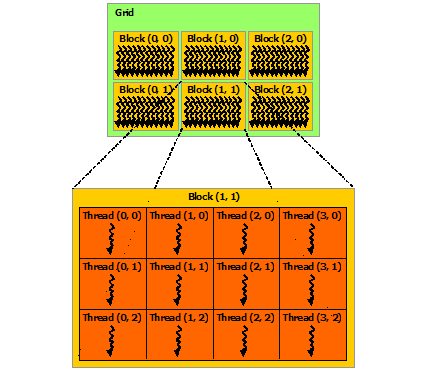
This is the standard grid-stride loop pattern:
threadIdx.x: Thread index within a block (0 to blockDim.x-1)blockIdx.x: Block index within the gridblockDim.x: Number of threads per blockgridDim.x: Number of blocks in the grid
Kernel Launch Configuration
wrapper.SetDistrib(prop.multiProcessorCount * 16, 256);
- First parameter: Number of blocks (typically
SM count × 16for good occupancy) - Second parameter: Threads per block (typically 128, 256, or 512)
Build and Run
- Build the solution in Visual Studio (Debug or Release)
- The Hybridizer will automatically:
- Generate CUDA source code
- Compile with nvcc
- Link the resulting binary
- Run the executable
Expected Output
SUCCESS!
What Happens Under the Hood
Common Issues
| Issue | Solution |
|---|---|
| "CUDA device not found" | Check NVIDIA driver installation |
| "nvcc not found" | Add CUDA Toolkit to PATH |
| Wrong results | Verify array sizes match kernel expectations |
Next Steps
- Run and Debug — Debugging GPU code
- Core Concepts — Understand work distribution
- CUDA Backend — Deep dive into CUDA features